Monday
Nov192012

Data Whisperer: Detecting & Extracting Meaning from Changing Data Presentation at Philly .NET Code Camp 2012.2

Philly .NET Code Camp 2012.2

My thanks to Philly .NET and PSSUG for inviting me to speak at Code Camp 2012.2 on Saturday November 17, 2012.  Additional thanks to all thouse who attended either of the presentations.

Download the code and presentation:   Data Whisperer - Detecting & Exctracting Meaning From Changing Data.zip

 The folks at the Microsoft Technology center for Philadelphia recorded the presentations at the PSSUG meeting on Wednesday November 7, 2012.  You can see Mark Kormer on Big data and this presentation here at The Philadelphia MCT Community Portal.


Monday
Oct172011

Learn RegEx in T-SQL & kick as{2}|a[s][s]+

Thanks to all who attended the Learn RegEx in TSQL presentation at the Philly.Net Code Camp 2011.2.  Especially those who took the time to catch up with me throughout the day.

RegEx is a big topic and is hard to learn in only an hour and 20 minutes. I do hope that you got enough information to get yourself started in learning how to use RegEx in TSQL in your own environment.

All the links discussed in the presentation are included throughout this post. The PowerPoint was not included since it seemed kind of pointless without me also attached to the presentation. Some of the content was extracted and included in this post.

The Class!

Code Camp Heroes Bill and Rob

Code:

Down Load The code for the presentation.

The file 01 - installRegexAssembly.sql is my version of the create assembley and create of the RegEx functions in the [util] schema.

Goal:

Get you started using RegEx in TSQL

  • Load the toolbox with techniques 
  • Exposure to variations 
  • Under the hood knowledge


Warning

  •  There are many ways to write a Regular Expression!
  • RegEx isn’t inherently better then other solutions, even in TSQL.


What Are Regular Expressions?

Tools for matching and manipulating text RegEx pattern = as{2}

Will Match

  • ass
  • assume
  • passenger
  • class

Will NOT match

  • fast
  • cake
  • salad


Why use RegEx?

Over standard TSQL RegEx can:

  • Be faster
  • Be easier to code
  • Require fewer steps
  • Accomplish more complex tasks


What can RegEx be used for?

  • Validate Data Format 
  • Scrub Data 
  • Same as standard TSQL text functions but allow for more complex criteria 
    • Replace() 
    • LIKE ‘%’  --Technically not a function but you get the idea
    • PATINDEX() 
    • SUBSTRING()


How to use RegEx in TSQL?


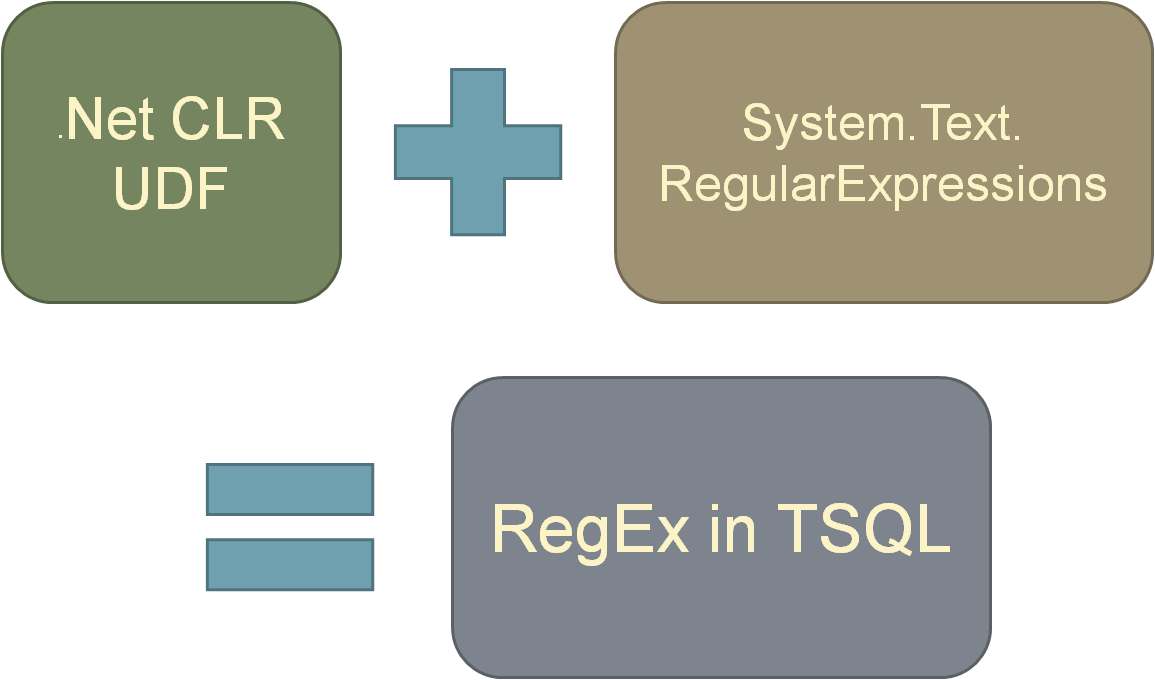
Formula for RegEx in TSQL

SQL 2005 and up supports .Net CLR for User Defined Functions

.Net has built in base class library for RegEx: System.Text.RegularExpressions

Combine above two facts -> RegEx in TSQL


Now how do we actually use RegEx in TSQL?

Write the code for the .NET based UDFs ourselves 

OR

Use someone else's code!

http://www.simple-talk.com/sql/t-sql-programming/clr-assembly-regex-functions-for-sql-server-by-example/

The is an excellent article by Phil Factor over at Simple-talk.  There are a few parts to this article including the basics of writing .NET based functions in TSQL.  There is also a file that lets you jump start using RegEx in TSQL.

Keep in mind you will need to be running SQL 2005 or newer for this code to work.  It will also work on express versions of SQL server too.  The CLR will also need to be enabled for the database you want to install the RegEx functions.

 There are 4 files at the top of the article you can download:

  1. InstallRegex.sql
  2. installRegexAssembly.sql
  3. installRegexSample.sql
  4. RegexSQLCLR.vb

The fourth file is a text file with the VB code that gets compiled in to the DLL.  You do not need to do this unless you are curious and interested in the details.

To jump right in to using the TSQL UDFs in your data base just run the first to files.  The first one, despite its name creates the Assembly on the SQL db.  The second creates the functions in TSQL that are implemented by the code in the assembly.

NOTE: The code linked to above installs the functions in the [dbo] schema.  The version used in the presentation was modified to create a new Schema [util] and install the assembly and functions under that schema.


Overview of the RegEx Functions

The functions installed by the SQL scripts will create 9 funtions that will be useable in your TSQL code.  The break down as follows based on return type:


  • Boolean 
    • RegExIsMatch() 
  • Text Returning 
    • RegExReplace () 
    • RegExReplaceX ()
    • RegExMatch()
  • Table Valued 
    • RegExSplit() 
    • RegExMatches () 
  • Integer 
    • RegExIndex() 
  • RegEx Utility 
    • RegExEscape() 
    • RegExOptionEnumeration()


Tips for Learning RegEx patterns

Have a good cheat sheet. Here are some I've used

http://www.regular-expressions.info/reference.html

http://regexlib.com/CheatSheet.aspx

http://regexlib.com/DisplayPatterns.aspx This link is to a libray of expressions for matching common patterns.

Thursday
Oct062011

Presenting at Philly.Net Code Camp 2011.2 Oct 15

I will be presenting at Philly.Net Code Camp 2011.2 on Oct. 15 http://goo.gl/yYGXv

Presentation will be:  Learn RegEx in T-SQL & kick \

Session Description: (This is what users will see, please go for concise and elegant) Regular Expressions, aka RegEx, is a powerful syntax for finding patterns in text, which has been around since the 60’s. Until recently the power of RegEx has been an elusive tool to T-SQL Developers. This presentation will provide an introduction to Regular Expressions in general and concentrate on the tools and techniques for using them in T-SQL. Find out how easy and powerful Regular Expressions can be for everyday tasks such as basic where condition criteria to validating and scrubbing data. Come on you know you’ve always wanted to learn RegEx ever since you first saw them. Now is your chance to get a jumpstart on using them. You will leave with the tools, knowledge and resources to get you started.

Monday
Oct112010

Data Modeling Software Tools List

Embarcadero's ER/Studio has been my data modeling tool of choice for over a decade.  There are many good things about the product but there are also things I don't like or wish were better or different.   It is also an expensive software package, approximately $2K for a SQL server only version plus around $800 for annual maintainence including upgrades.

Roughly once a year I get a hankering to check out the grass on the the other side of the fence.  This hankering hit me a few weeks ago.  Google brought me to the following website that had a nice list of tools with a brief description and cost:

http://www.databaseanswers.org/modelling_tools.htm

A few of the tools caught my eye and I downloaded and tested a few.  The short answer is I'm sticking with my trusted albeit not perfect ER/Studio.  The good news is the quality and sophistication of the affordable tools has improved greatly.  Here is a list of a few of the tools that made the short list:

ModelRight 3.6

dbconstructor

DataArchitect

DeZine for Databases

When I did my testing I didn't document my findings and impressions of these packages for the purpose of posting the information.  If I needed a tool to get some work done without spending a lot of money there are definitely a few out there that would be useful, but there are no must have superstars in the pack.


Wednesday
Jun092010

Data Truncation Handling Techniques

Question:

we are trying to get this to error because the value is getting truncated. What do i need to change on our warning settings?
SELECT CONVERT(varchar(10), 'adededddasdfasdf')


On a regular basis I use CONVERT(VARCHAR(10), GETDATE(), 101) to convert

2010-06-09 08:03:07.313    to    2010-06-09

I'm counting on the truncation to cut out the data I don't want. I don't recall ever getting a truncation error in this case.  So there may not be a setting to cause this to occur.  Unfortunately, I do not know the direct answer to the question.

On the other hand truncation errors are common when doing ETL projects.  Here is an example of what does cause a truncation error to bubble up.

CREATE TABLE #MyTable ( MyField VARCHAR(10) NOT NULL ) 

INSERT INTO #MyTable ( MyField )VALUES ( 'abcdefghij') 
INSERT INTO #MyTable ( MyField )VALUES ( '12345678901112') 

SELECT * FROM #MyTable AS mt 


Executing this code will have the following in the message window:

(1 row(s) affected)
Msg 8152, Level 16, State 14, Line 10
String or binary data would be truncated.
The statement has been terminated.

(1 row(s) affected)

This code will cause a truncation error to abort the second insert statement.   The error is useful and important because it helps maintain data integrity.  On the other hand it would be nice to find a way to avoid the problem in the first place

Here are some techniques for preemptively dealing with truncation errors:

When dealing with unstable or unverified data sources a good approach is to validate the data prior to loading. Typically this involves loading the data in to varchar(max) fields and running various metadata inspections such as LEN(), ISNUMERIC(), ISDATE(), etc.

Yes it takes time, but in an automated process it is more important to run without error and be able to generate meaningful error reports on what data is flawed.

---------------------------------------
-- In line validation
---------------------------------------
;
WITH SourceData AS (    
    SELECT 'adededddasdfasdf' AS MyField
    UNION ALL SELECT 'abcdefghij'
    UNION ALL SELECT '12345678901112'
    UNION ALL SELECT '1234567890'
)
SELECT
      CONVERT(VARCHAR(10), MyField) AS MyField_Len10
    , CASE    
        WHEN LEN(MyField) <= 10 THEN 0
        ELSE 1
      END AS IsTruncated
FROM 
    SourceData


---------------------------------------
-- List of truncation errors - with option raised error if it's really needed
---------------------------------------
DECLARE @ErrorCount    INT
SET @ErrorCount = 0
;
WITH SourceData AS (    
    SELECT 'adededddasdfasdf' AS MyField
    UNION ALL SELECT 'abcdefghij'
    UNION ALL SELECT '12345678901112'
    UNION ALL SELECT '1234567890'
)
SELECT
      CONVERT(VARCHAR(10), MyField) AS MyField_Len10
FROM 
    SourceData
WHERE
    LEN(MyField) > 10    

SET @ErrorCount = @@ROWCOUNT
IF @ErrorCount != 0
    BEGIN
        RAISERROR('There were %d truncation errors', 16,1,@ErrorCount)
    END

A more useful approach to check for the error case.

GO
---------------------------------------
-- Alt solution without returning data
---------------------------------------
DECLARE @ErrorCount    INT
SET @ErrorCount = 0
;
WITH SourceData AS (    
    SELECT 'adededddasdfasdf' AS MyField
    UNION ALL SELECT 'abcdefghij'
    UNION ALL SELECT '12345678901112'
    UNION ALL SELECT '1234567890'
)
SELECT
     @ErrorCount = COUNT(*) 
FROM 
    SourceData
WHERE
    LEN(MyField) > 10    

--SET @ErrorCount = @@ROWCOUNT
IF @ErrorCount != 0
    BEGIN
        RAISERROR('There were %d truncation errors', 16,1,@ErrorCount)
    END


The RAISERROR code is there to illustrate how to cause an error to bubble up if that is the desired behavior.

Note: The IF EXISTS() syntax would also have worked well in this case.  However, If EXISTS()  doesn’t work with CTEs and the error count would not have been available for the error message.